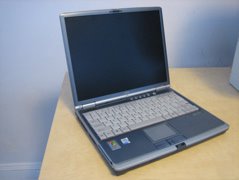
 The Patient: Fujitsu S-Series Laptop.
The power connector of my S-Series Fujitsu laptop failed (a Lifebook S6110), just like so many others out there. I called up Fujitsu for repair; their local service center wanted about $80 just to look at the laptop (which obviously only needed a new connector). I concluded that it was silly for me to throw $80 at an estimate for repairing the power connector, so instead I went after repairing it myself.
The Patient: Fujitsu S-Series Laptop.
The power connector of my S-Series Fujitsu laptop failed (a Lifebook S6110), just like so many others out there. I called up Fujitsu for repair; their local service center wanted about $80 just to look at the laptop (which obviously only needed a new connector). I concluded that it was silly for me to throw $80 at an estimate for repairing the power connector, so instead I went after repairing it myself.
Researching the problem.
At first I looked on the web for the right connector. After searching high and low, I found that the Asia Industrial Company appears to sell a very similar part, the DS-208. Let me know if you contact them for this jack. I also saw a part for sale by a laptop power jack "repair" web site, but it didn't look like it would be mountable on my laptop's motherboard - the pins are in a different location, and I think it'd be very difficult to properly mount this part inside of my laptop.
Going at it.
 Pigtails off of the board
I decided to start by adding a few pigtails to the motherboard. I opened the laptop, with the helpful instructions found here. Then I soldered in a short length of wire.
From there, I added a simple connector on the end of the pigtail.
Pigtails off of the board
I decided to start by adding a few pigtails to the motherboard. I opened the laptop, with the helpful instructions found here. Then I soldered in a short length of wire.
From there, I added a simple connector on the end of the pigtail.
 Phase 1 complete, Lifebook operational!
At least my laptop is now, um, laptop-able once again. It does look a bit silly with the pigtail, but is is fully functional. I hope to acquire the correct DC Jack for the laptop. Please contact me if you have any leads or advice.
Phase 1 complete, Lifebook operational!
At least my laptop is now, um, laptop-able once again. It does look a bit silly with the pigtail, but is is fully functional. I hope to acquire the correct DC Jack for the laptop. Please contact me if you have any leads or advice.
Beyond the Fujitsu
My next step will to try to get that DS-208 part and give it a shot. It seems like others may be sold as the DC-005.
To be honest, my Fujitsu is getting a little old, so I might end up buying another new laptop. There are a lot good laptops out there... and that's why I didn't initially go for the "Fujitsu service center" repair.